Things I Did
Brand Creation
Product UI/UX
Product Front-End Code (React)
Website Design & Development
Investor & Sales Decks
Clothing & Event Design
Company
TL;DR
Role
Co-Founder
Creative Director
Year
2024 → Present
Live website
Visit websiteTL;DR is a software platform that empowers livestreamers with growth tools like AI-generated live highlight clips, video editing, and distribution across socials.
I joined at formation and built everything users see: the brand and website from zero, the product UX, and large parts of shipped React front-end. Most feature and product direction decisions were mine.
Product Design
Product design at TL;DR wasn’t just hand-off work. I made most feature and UX direction calls, deciding not just how things looked but what got built and why.
Three calls from the start
Short clips are how streams find new viewers, and most streamers have no time to make them. Three calls made at the start shaped everything after.
01
Built for the minutes around a stream
Streamers don’t sit in TL;DR. They open it before going live, between sessions and right after, next to OBS and Twitch. So the dashboard is dark, fast to scan, and every question has a fixed place.
Dashboard
One screen answers the four questions a streamer brings to it, each in the same place every time.
-
Is TL;DR seeing my stream?
Before going live, the status banner says so, with support one click away.
-
What posts when I go live?
StreamSignal shows the post and where it goes.
-
How did that one go?
Views, clips and chat activity from the last stream.
-
What’s going out next?
Upcoming posts, by day.
02
Clips arrive while you’re still live
TL;DR was the first to clip a stream while it’s happening, not from the VOD afterwards. So the product shows each clip as it lands: when it happened, how it was caught and how good it is.
A stream’s best moments show up in its chat. Try it on the stream below.
- AI clip
- Voice clip
Clip markers are added for this page. In the product, the chart is only the line.
| Time into stream | Chats | Clip |
|---|
Video Library
Clips land here mid-stream, grouped by the stream they came from.
-
A score on every clip
Clip Score, 0 to 100, so the best moments stand out.
-
How it was caught
AI Clip, or Voice Clip with the words that triggered it, like “Clip that”.
-
Straight to editing
Edit Clip sits on every card.
03
At home next to Twitch
TL;DR started as an extension inside Twitch, installed 35,000+ times. So it borrows what streamers already trust, a purple close to Twitch’s on dark surfaces, and adds a pixel logotype of its own.
Everything is tuned for a dark room. Five surface steps carry depth, and type is Open Sauce Two at two weights.
#9851FB
Actions, selection and Pro. A neighbour of Twitch’s #9146FF.
#C197FF
The logo’s pixels, the one break from white.
#C262FD #3A33FF #3112F5
Moments worth celebrating, like the You’re Live badge.
#F03D3D
Live badges and errors, and nothing else.
#070707 to #272727
Five steps from the page up to modals. Never pure black.
100 72 48 32%
White at four levels of emphasis instead of extra greys.
From clip to post
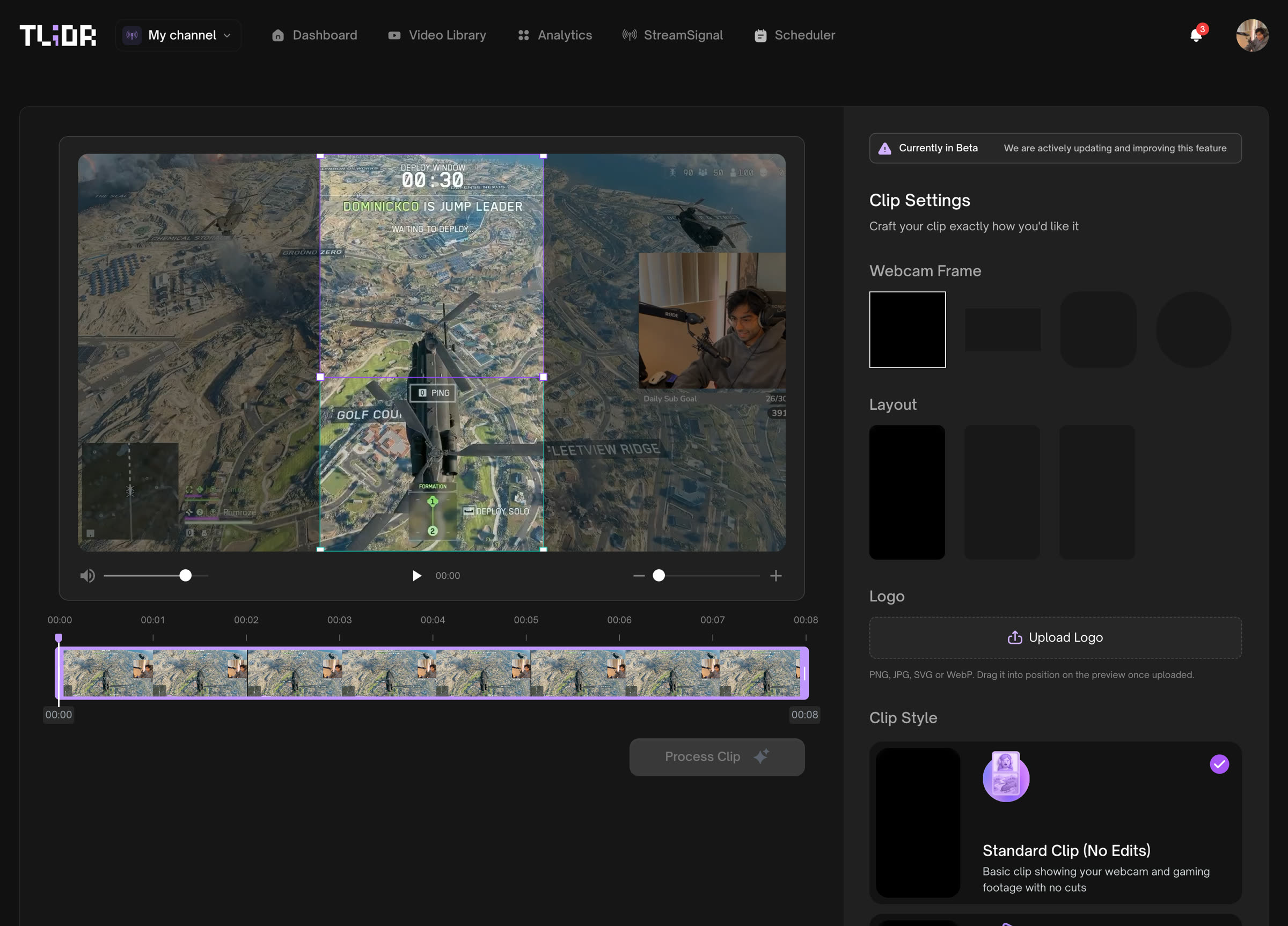
After the stream, the best clips go out. Edit them into vertical video, then schedule them across platforms, without leaving TL;DR.
Front-End Builds
Every handoff lost something - spacing, states, motion. So I cut the handoff: Now I build my designs in React myself, working with Claude Code and MCP tooling to ship accurate, functional front-end at speed. Product development sped up by multiples.
Before
Figma files
Every feature started as a full Figma flow — screens, states, and edge cases specced before any code.
After
React prototype dashboard
The same flows rebuilt as a working React dashboard — spacing, states, and motion carried over intact.
Feature Builds
Building front-end myself changed what I could take on. Instead of designing features for someone else to build, I started ideating full features and building them myself. Both featured in-depth below.
My TL;DR
I designed and built out a fully functional prototyped version of My TL;DR, an upgraded link-in-bio product specifically targeted towards live streamers, while keeping everything inline with the TL;DR brand.
Some highlighted features include:
Modular bento-style layout engine that adapts based off what the user sets up
Detection if the user is live on Twitch or Kick to drive traffic to their stream
Opt-in for user to send out email and text blasts when they go live
Stream highlight clips from TL;DR
User’s livestreaming schedule
Links to their affiliate products
Streamhub
I also designed and built out Streamhub for our B2B users, giving a master account the ability to watch all the sub accounts streams simultaneously on a customizable canvas
Some highlighted features include:
Drag and drop canvas to position and resize sub account livestreams
Manual clipping button per sub account livestream
Ability to toggle on & off subaccounts in the canvas view
Brand & Marketing
Before there was a dashboard, there was the brand. The identity, the website that sold the product, and the decks and booths that took it to TwitchCon.







Extension Store
35,000+
Twitch Extension Installs
The Brand System
TL;DR originally began as an extension inside of Twitch’s ecosystem, so the brand had to feel native to it. I built the identity on codes streamers already trust: Purples similar to Twitch’s spectrum and a pixel logotype that gives TL;DR its own mark inside that familiar world.
The platform does a bunch of things. The website had to promise just one: growth. I designed the site so every feature is framed as a piece of the puzzle of growing as a livestreamer.
10,000+
Signups to our platform
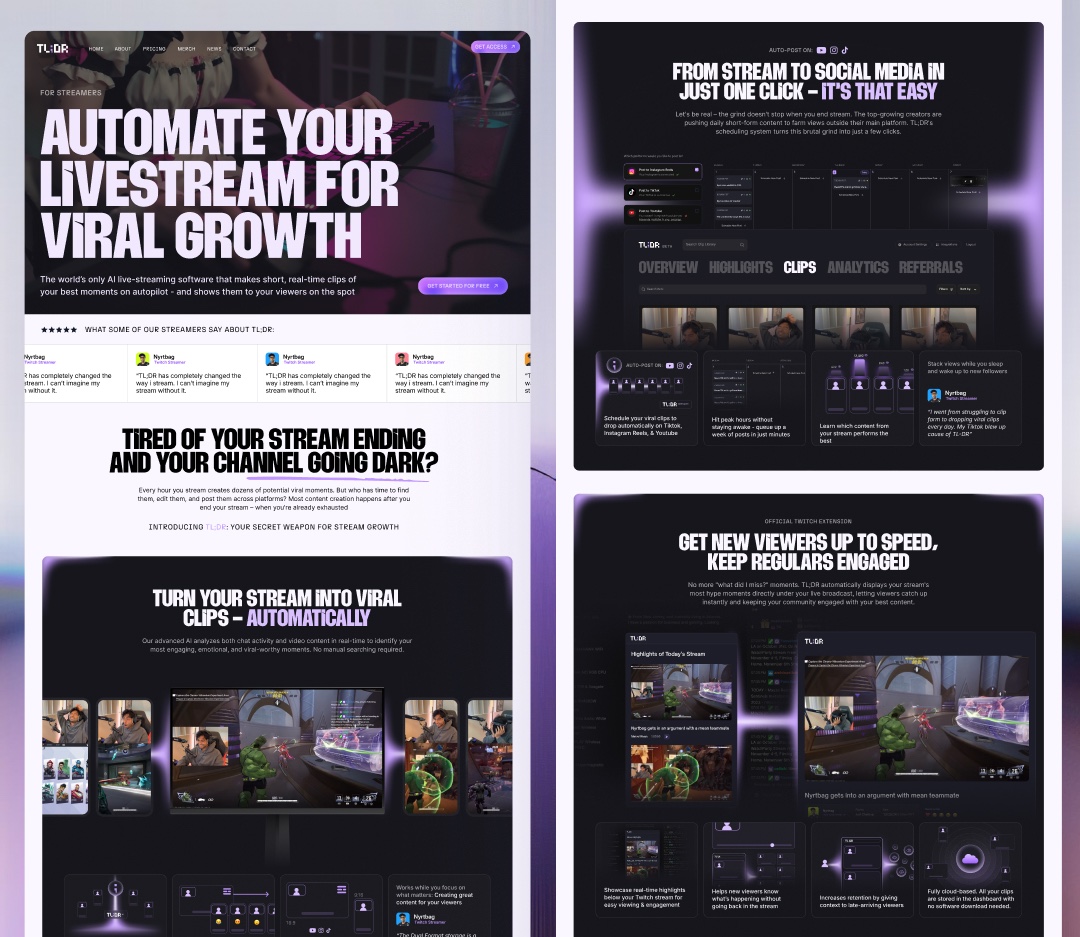
The Website Challenge
I designed and built the entire website end-to-end: structure, copy hierarchy, and development on Webflow. Streamers don’t shop for features, they shop for outcomes - so every section leads with what a streamer gets and demotes “how it works” to a supporting layer.
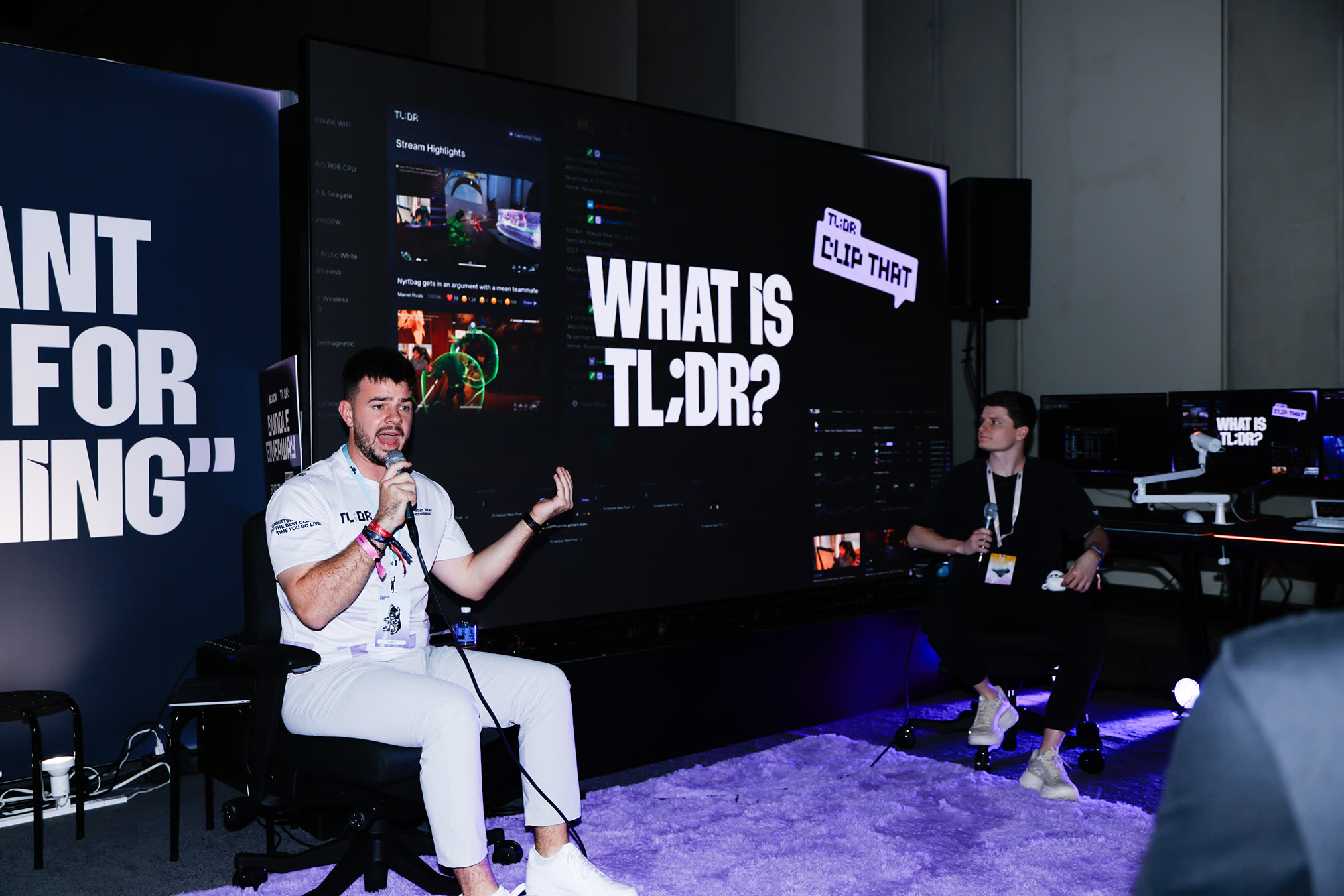
I created TL;DR's brand system to work even outside the product - in B2B and pitch decks, on convention floors, and even on clothing. Here's some other places I pushed TL;DR's design system to:
Twitchcon San Diego 2025
B2B and Pitch Deck Design